In the modern digital classroom, the integration of portable computing devices has transformed from a luxury into a fundamental necessity. Educational institutions worldwide are deploying massive fleets of laptops, Chromebooks, and tablets to facilitate interactive learning and digital literacy. However, managing dozens of devices per classroom presents a significant logistical hurdle regarding power management, physical security, and organized storage. This is where the specialized charging cart becomes the backbone of a functional 1:1 or shared device program in schools.
A charging cart is a mobile, secure storage furniture solution designed to simultaneously charge, store, and transport multiple electronic devices such as laptops, Chromebooks, and tablets. It ensures that a classroom's entire fleet of digital tools is powered up and ready for instruction while protecting expensive hardware from theft and physical damage through integrated locking mechanisms and ventilated steel construction.
As schools transition away from traditional computer labs toward mobile learning environments, the demand for versatile power solutions has surged. Whether a district utilizes iPads for early childhood education or high-performance laptops for secondary computer science courses, the right infrastructure is required to keep these tools operational. This guide explores the various configurations of the charging cart, its technical advantages over stationary stations, and how to select the optimal model to support diverse educational technology ecosystems.
Table of Contents
What is a charging cart?
Types of charging carts for schools
Key features to look for in a charging cart
Charging carts vs charging stations
Common classroom and school use cases
How to choose the right charging cart for your school

What is a charging cart?
A charging cart is a heavy duty mobile cabinet equipped with internal power strips or USB hubs designed to centralize the charging and storage of mobile devices like a laptop charging cart or a chromebook charging cart. It serves as a consolidated hub that eliminates the need for multiple wall outlets in a classroom while providing a secure, lockable environment for high value assets.
The fundamental design of a charging cart revolves around maximizing space efficiency and power distribution. In a typical school setting, a single classroom might have 30 or more devices. Standard wall outlets cannot handle this load safely or conveniently. The charging cart solves this by using integrated power management systems that can handle high-draw devices like a computer charging cart without tripping circuit breakers. These units are typically constructed from high-grade cold-rolled steel to withstand the rigors of a school environment.
Internally, the charging cart features adjustable or fixed dividers that create individual slots for each unit. This organization prevents devices from scratching against one another and ensures that cables are managed neatly. For devices that charge via USB, such as a charging cart for ipad or other tablets, many modern carts offer direct USB-A or USB-C charging ports, removing the need for bulky AC adapters. This level of organization is critical for teachers who need to distribute and collect devices quickly during short transition periods between lessons.
Furthermore, mobility is a defining characteristic. Equipped with industrial-grade casters and ergonomic handles, a charging cart allows a single staff member to move a complete set of technology between classrooms or into a secure central storage room at the end of the day. This flexibility supports "carts on wheels" programs where technology is shared across different departments, maximizing the return on investment for the school's hardware budget.
Types of charging carts for schools
Schools can choose from several variations of a charging cart including AC-powered units for traditional laptops, USB-C fast-charging models for modern tablets, and universal mixed-device carts that accommodate a variety of hardware sizes. Choosing the specific type depends on whether the school utilizes a chromebook charging cart, a tablet charging cart, or a high-capacity computer charging cart for larger workstations.
The most common type found in K-12 environments is the chromebook charging cart. Since Chromebooks are the standard for many student 1:1 programs, these carts are optimized for slim profiles and efficient AC power delivery. They often feature "smart" charging logic that cycles power between different banks of devices to prevent electrical overloads. This ensures that even with a full load of 30 to 40 units, the school's electrical infrastructure remains stable.
For specialized departments like art or early education, the charging cart for ipad or tablet charging cart is preferred. These units are often more compact and focus on USB connectivity. Because tablets generally have longer battery lives but require frequent syncing, some of these carts also include data synchronization capabilities. This allows a teacher to update software or deploy apps to an entire fleet of iPads simultaneously while they are docked and charging within the secure cabinet.
Lastly, the computer charging cart or charging cart for laptops is designed for larger, more power-intensive hardware. These are essential for high schools or technical colleges where students use "power users" laptops for video editing, CAD software, or gaming development. These carts feature wider slots to accommodate thicker chassis and larger power bricks. They also prioritize advanced ventilation and cooling fans to dissipate the heat generated by large batteries during the rapid charging process.
| Cart Type | Best Used For | Typical Capacity |
| Chromebook Cart | Standard 1:1 Classrooms | 30-42 Devices |
| Laptop Cart | High-performance workstations | 20-30 Devices |
| Tablet/iPad Cart | Primary schools & Art labs | 32-48 Devices |
| Mixed-Device Cart | Multi-purpose resource rooms | Variable |
Key features to look for in a charging cart
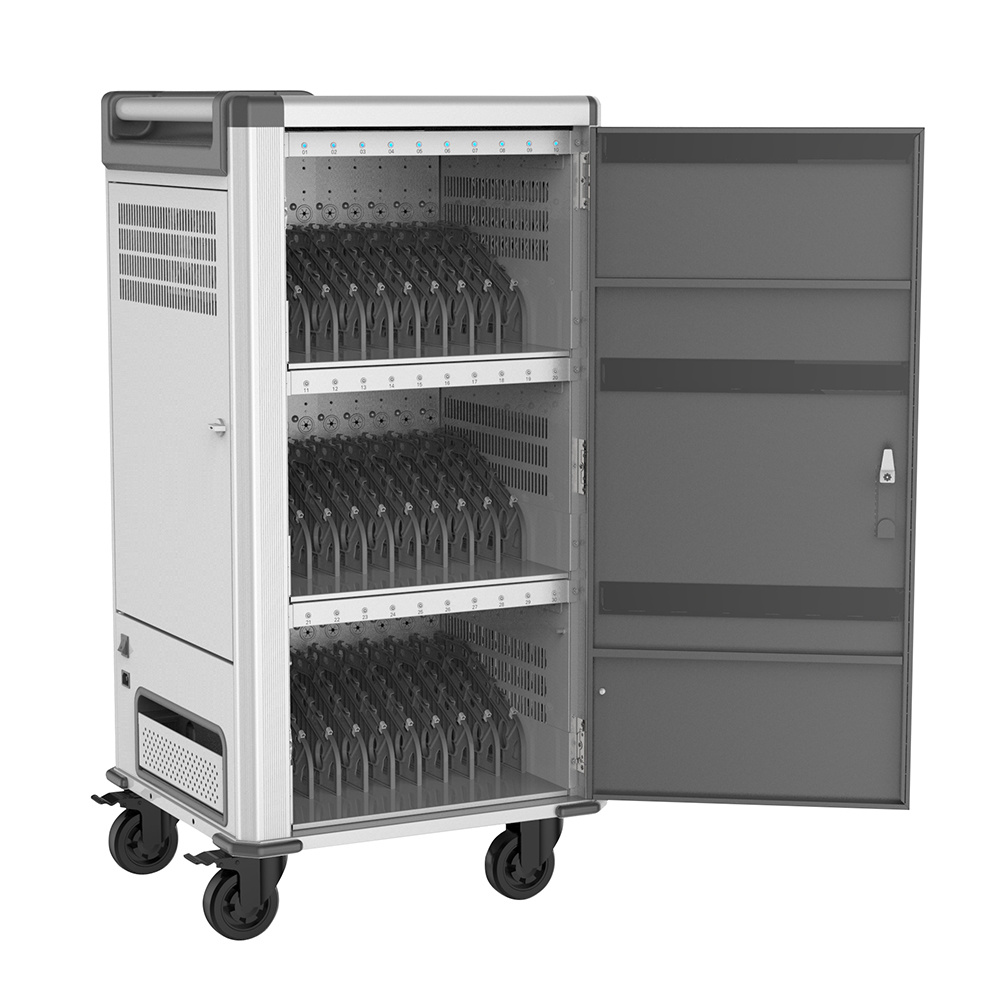
When evaluating a charging cart, decision-makers must prioritize structural durability, advanced power management systems, cable management efficiency, and robust security features to ensure the long-term safety of the equipment. A high-quality charging cart for laptops or a tablet charging cart should include features like intelligent charging, ventilated panels, and heavy-duty locking mechanisms.
Security is the primary concern for any school investment. A professional-grade charging cart should be equipped with a three-point locking system and reinforced steel doors. Many schools opt for carts that allow for both padlock compatibility and integrated key locks. The goal is to create a "bank vault" for the school's digital assets. Additionally, the inclusion of non-marring, locking casters ensures that once the charging cart is positioned in a classroom, it stays put and does not pose a safety risk to students.
Power management is another critical technical feature. The best charging cart models utilize "Smart Charging" technology. This system monitors the power draw of each device and prioritizes those with the lowest battery levels. It also includes surge protection to shield expensive electronics from lightning strikes or grid fluctuations. For a computer charging cart that holds high-wattage laptops, a sequential power timer is vital to prevent an initial inrush of current from blowing a fuse when the cart is first plugged into a standard 15-amp or 20-amp circuit.
Finally, never overlook the importance of cable management. A poorly designed charging cart for ipad or chromebook charging cart can quickly become a "spaghetti mess" of tangled wires. Look for carts with dedicated cable channels, "pro" wiring trays, and individual cord clips. This not only makes the cart look professional but also reduces wear and tear on the charging cables themselves, saving the school significant money on replacement parts over the lifetime of the fleet.
Essential Component Checklist
Construction: 18-gauge or 20-gauge cold-rolled steel.
Ventilation: Perforated doors and side panels to prevent overheating.
Mobility: At least two locking casters and ergonomic push handles.
Electronics: UL or ETL certified power strips and internal surge protectors.
Charging carts vs charging stations
The primary difference between a charging cart and a charging station lies in mobility and scale, where a charging cart is a mobile, high-capacity solution for entire classrooms, while a charging station is typically a stationary, smaller-scale unit for communal areas. While a computer charging cart is built to move between rooms, a charging station is often wall-mounted or desktop-based for quick-access top-offs.
A charging cart is designed for the "fleet management" model. It assumes that a large number of devices need to be moved, secured, and charged in one cohesive unit. For example, a chromebook charging cart in a middle school might be moved from the history department to the science wing depending on the day's lesson plan. The mobility factor makes the charging cart a versatile tool for resource sharing across an entire campus. It serves as both a transportation vehicle and a secure home base for the hardware.
In contrast, charging stations are better suited for "drop-in" use. These are often found in school libraries, student lounges, or administrative offices. A tablet charging cart might hold 40 devices, but a station might only hold 5 to 10. Stations are ideal for environments where students bring their own devices (BYOD) and need a quick charge during lunch, or for small-group sets of iPads. Because they lack wheels and high-capacity storage, they are generally less expensive but also less secure and less flexible than a full-scale charging cart for laptops.
When deciding between the two, schools must consider their deployment strategy. If the goal is to provide every student in a classroom with a device that stays at school overnight, a charging cart is the only logical choice. If the goal is to provide a few emergency power points for students whose personal laptops have died, a stationary station is sufficient. For most K-12 institutions, the computer charging cart remains the standard because it addresses the three pillars of ed-tech management: security, power, and organization in one mobile package.
Common classroom and school use cases
Charging carts are used in various educational scenarios including 1:1 device programs, shared classroom sets, mobile testing centers, and after-school enrichment programs where a charging cart for laptops or a chromebook charging cart provides organized access to technology. They allow teachers to transform any standard room into a fully functional computer lab within minutes by rolling in a computer charging cart.
The most frequent use case is the 1:1 classroom model. In this setup, a chromebook charging cart sits at the back of the room. Students retrieve their assigned device at the start of the day and return it for charging before dismissal. This routine teaches students responsibility while ensuring that the teacher never has to deal with "dead battery" excuses that derail lesson plans. The charging cart acts as a central organizational point that streamlines the beginning and end of every instructional period.
Another vital use case is the "Mobile Computer Lab." Many schools cannot afford to equip every single classroom with a full set of laptops. Instead, they invest in several high-capacity computer charging cart units that can be reserved by teachers. A teacher can sign out a laptop charging cart for a specific period, roll it into their room, and instantly provide 30 students with high-powered computing resources. This "on-demand" technology model is highly cost-effective and ensures that hardware is being used at its maximum capacity throughout the school day.
Beyond daily instruction, the charging cart is indispensable during standardized testing seasons. Modern assessments are almost entirely digital, requiring hundreds of devices to be fully charged and ready simultaneously. A fleet of chromebook charging carts or tablet charging carts allows school IT coordinators to stage devices in gymnasiums or cafeterias, ensuring that every student has a functional machine for their exams. The ability to lock the carts overnight in the testing area provides the necessary security for these high-stakes periods.
Science Labs: Using a charging cart for ipad to store tablets used for data collection and digital microscopes.
Libraries: Providing a computer charging cart for checkout programs or research sessions.
Professional Development: Using a laptop charging cart to facilitate teacher training workshops in various meeting rooms.
How to choose the right charging cart for your school
Choosing the right charging cart requires an assessment of your current device dimensions, total unit count, electrical capacity of your classrooms, and the physical layout of your school building to ensure the laptop charging cart or chromebook charging cart fits your specific needs. It is essential to match the charging cart for ipad or computer charging cart to the specific power requirements and physical footprints of your hardware.
The first step in the selection process is "Device Audit." Measure your devices including the protective cases. Many schools buy a chromebook charging cart only to find that the ruggedized cases they put on the Chromebooks make them too thick for the cart's slots. Ensure that the charging cart for laptops you select has adjustable dividers or wide enough slots to accommodate the "real world" size of your equipment. Additionally, consider the placement of the charging ports on your devices; some carts are better suited for side-plugging versus rear-plugging cables.
Next, evaluate the "Power Infrastructure." If you are planning to purchase a high-capacity computer charging cart for 40 large laptops, check if your classroom's electrical circuit can handle it. If your building is older, you must look for a charging cart with a sophisticated power management system that utilizes "round-robin" or "zone-based" charging. This prevents the cart from drawing too much power at once and tripping the breaker, which is a common and frustrating issue in aging school facilities.
Finally, consider the "Long-term Scalability." Technology cycles every 3-5 years. While you might be using iPads today, you might switch to Chromebooks in the future. Investing in a universal charging cart with adjustable shelves and interchangeable power strips (AC vs. USB-C) ensures that your furniture remains useful even as your hardware evolves. A high-quality tablet charging cart or laptop charging cart is a 10-year investment; make sure it is flexible enough to grow with your school's digital vision.
Final Comparison for Decision Makers
| Factor | Consider This |
| Capacity | Do you need 10, 20, 30, or 40+ slots? |
| Device Size | Will it fit 11-inch Chromebooks or 17-inch Laptops? |
| Portability | Are the wheels large enough for elevator gaps and carpet? |
| Budget | Does the cart include the cables, or do you provide them? |
By focusing on these core pillars—security, power management, and physical compatibility—school administrators can ensure they select a charging cart that not only protects their financial investment but also enhances the daily learning experience for students and teachers alike. Whether it is a charging cart for ipad in a kindergarten class or a heavy-duty computer charging cart for a high school engineering lab, the right storage and power solution is the foundation of a successful digital campus.


